
Match the room
Discuss council chambers, boardrooms, training rooms or other meeting spaces. Microphone locations, sightlines and presentation sources shape the design.

Our Products
Explore Turncom360 products and choose a conversation around what your organization needs.

Some projects start with a device; others need the network, content and operating workflow around it. Explore the examples below, then tell us who will use the product and what you want it to do.
Proprietary software. Simple meeting controls. Turncom360’s proprietary meeting-control software puts the room’s everyday operation behind simple buttons. Start the meeting with one press. Go live with another. Your staff can run the agreed meeting workflow without a dedicated production director.
See one-touch AV meeting control
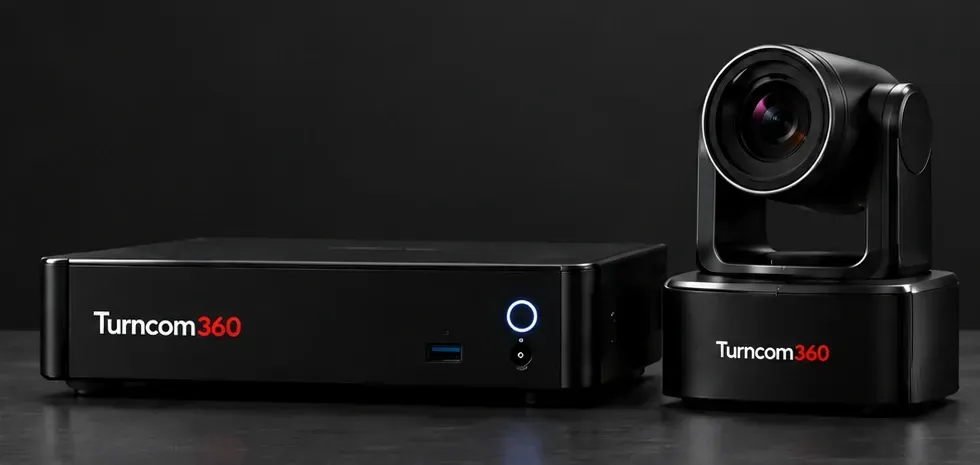
Push-button meeting recording and livestreaming. No director needed.
Bring your meeting capture and broadcast needs into one conversation. We’ll review your room, audio, camera and streaming requirements to recommend a suitable setup.
A coordinated meeting setup can bring together microphones, camera views, presentation content, local recording and livestreaming. The controls should make it clear whether you are saving a recording, broadcasting publicly, or doing both. We also plan the operator handoff and training.
Book a Consultation
Discuss council chambers, boardrooms, training rooms or other meeting spaces. Microphone locations, sightlines and presentation sources shape the design.
Plan local recording, a public livestream or both. Agree who starts and stops each output and where recordings are kept.
Choose the camera views and operator controls your staff need. Review the workflow before the first meeting.
Walk through preparation, sound and camera checks, presentation changes and shutdown with the people who run the room.
We review the existing microphones, cameras, display connections, network and control equipment before recommending what to keep or add. Compatibility is confirmed during planning.
Room photos or a floor plan, an equipment list, the number and location of speakers, presentation requirements and your recording or livestream destination are useful starting points.
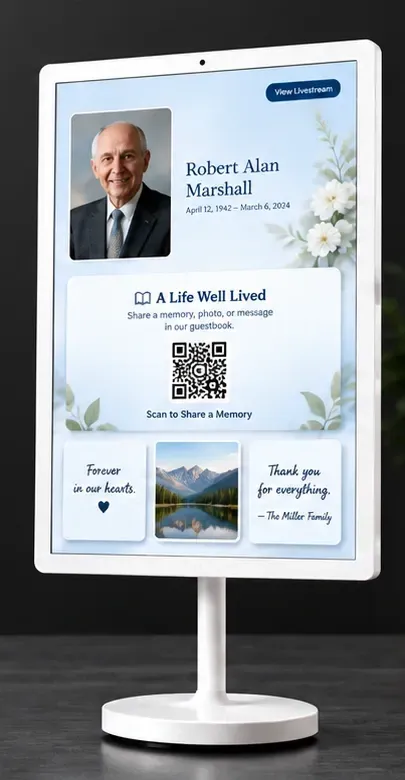
Scan the QR code to read an obituary, sign the guest book and leave a message from your phone.
One simple QR scan connects visitors to the obituary and digital guest book on their own phone. They can read about their loved one, sign their name and leave a message for the family.
Place a clear information point where visitors can find it. A QR code can take a visitor to the appropriate obituary page on their own phone. We review the destination content, how it stays current and where the white freestanding kiosk fits the space.
Book a ConsultationSceneri gives families and visitors a clear place to begin. Scan the QR code beside the memorial to open the obituary on your phone. Read the tribute, then sign the digital guest book and leave a memory, condolence or message for the family directly from your phone.
Find the memorial and scan its QR code. On your phone, read the obituary, add your name to the digital guest book and leave a message for the family.
Agree who supplies the memorial content, checks the destination and updates the display when services change.
Review lobby placement, visibility, power and the surrounding foot traffic so the freestanding kiosk fits the space.
Confirm the person’s name, image and destination link, then test the visitor’s scan-and-open experience.
Yes. After scanning the memorial QR code, visitors can open the obituary, sign the digital guest book and leave a comment or message for the family from their own phone.
We will discuss the content-update process, staff responsibilities and schedule with your team before selecting the setup. Bring examples of the memorial content you already use.
MEMBERREEL
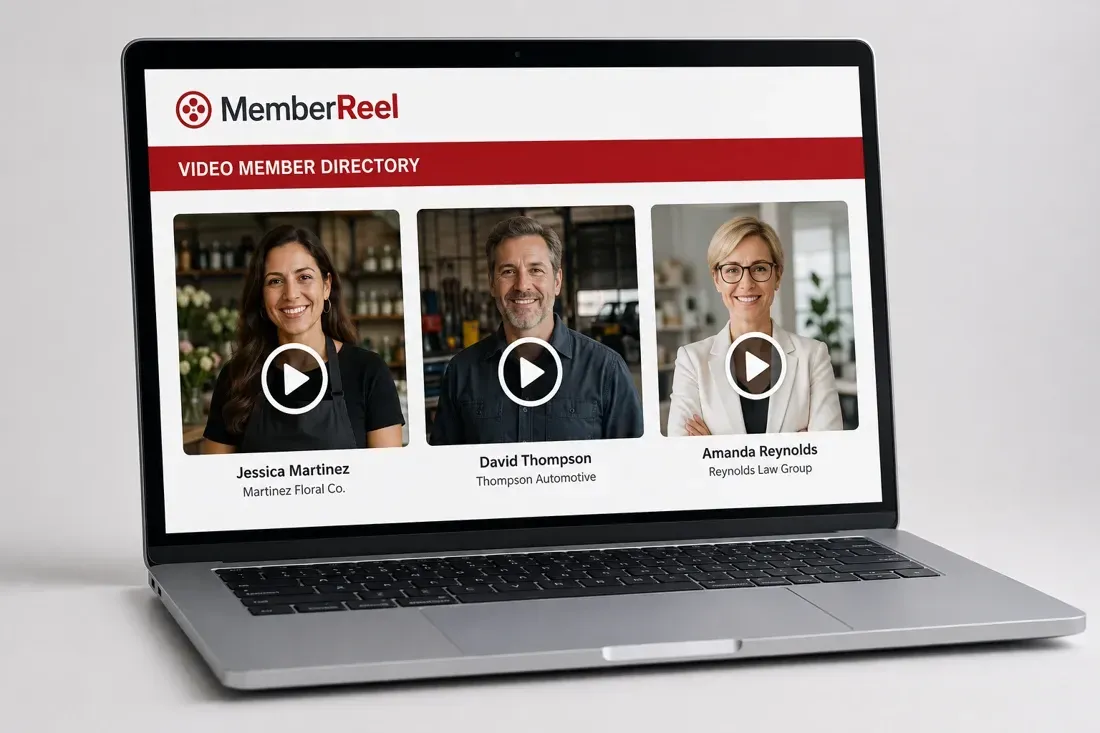
Help people meet your members, hear their stories and find a reason to connect.
MemberReel combines video business profiles, featured spotlights, a network board and a private member area. It works alongside your existing website, giving your community a dedicated place to discover and connect with local businesses.
Built for chambers of commerce, coworking spaces, BNI chapters, downtown alliances, realty offices and other membership organizations.
A sample business profile from the MemberReel demonstration. Select the button to open the video with sound.
Introduce the business and the person behind it with a short video, category, contact information, website and social links. Profiles are reviewed before listing.
Bring selected members or sponsors to the front of the directory with a featured position that can rotate as your community grows.
Give local businesses a place to share offers, needs, referrals, announcements and opportunities.
Help participating members discover businesses across partner organizations in their county, send direct messages and organize barter agreements with clear give, get and duration details.
Link your existing website to your branded MemberReel page. Your current website, association-management tools and billing can stay in place while members build their profiles and connections.
We review your community, branding and member information, then agree the rollout and approval process. Members can add their video and business details as they join. Your representative confirms launch timing and the features included in your setup.
Talk About MemberReel for Your Organization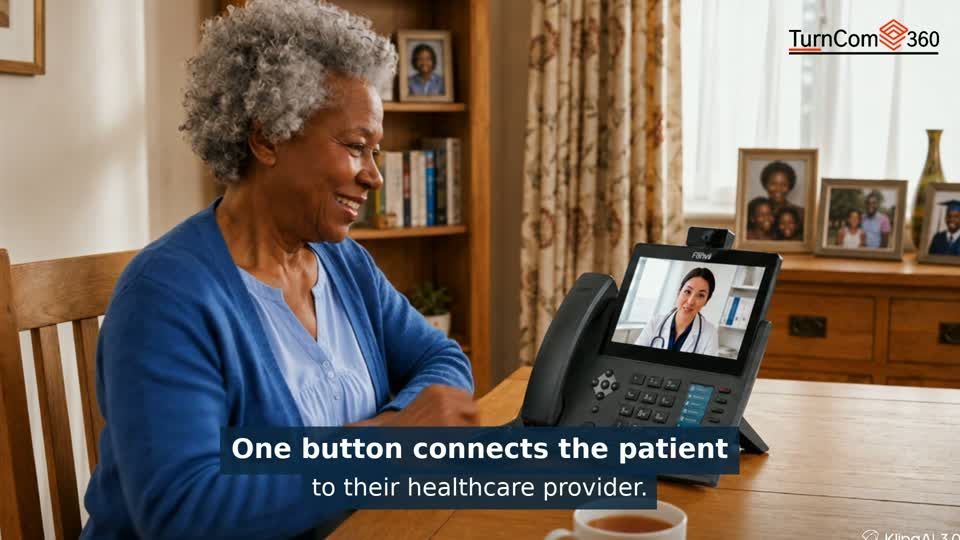
One programmed button connects a patient at home with a participating healthcare provider. Dedicated Fanvil video phones make face-to-face conversation possible without navigating a computer or smartphone app.
The connection is configured with the participating provider. Review the calling workflow and any video requirements before choosing equipment.
Explore Telehealth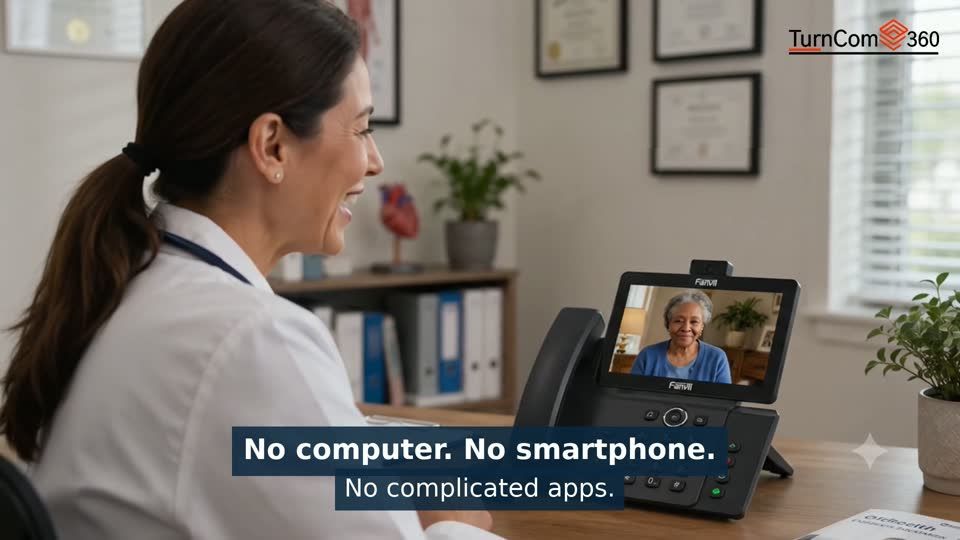
The patient’s phone is one part of the connection. We also plan the receiving provider’s equipment, the number or destination the button calls, and who will answer. A successful setup includes a test call and a clear explanation for the patient or caregiver.
A dedicated phone and programmed button give the patient a familiar starting point for the conversation.
Agree answering arrangements, connection requirements and how the provider endpoint fits the team’s workflow.
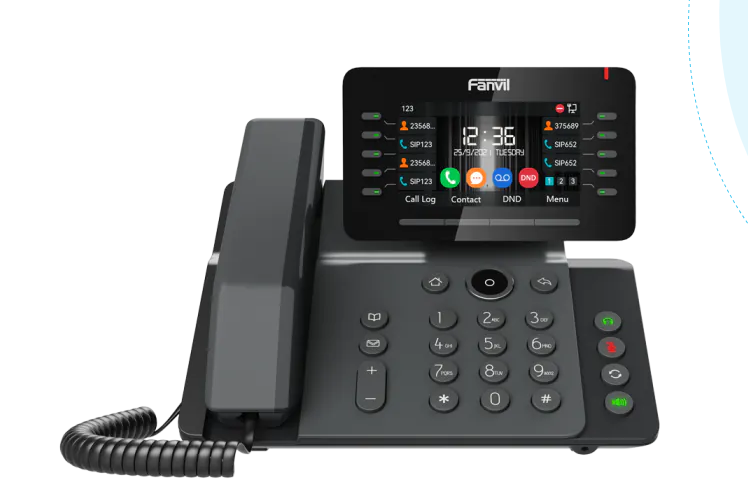
The Fanvil V65 combines an adjustable 4.3-inch display, HD audio, Wi-Fi and Bluetooth with programmable keys. Turncom360 helps plan the business number, extensions, greeting, call routing and support around the device.
Discuss a single business line or a system for your team. The store holds current device and subscription options; the configurator helps you plan a larger setup.
Explore Fanvil phone systemsAlongside our Turncom360 products, we use Fanvil equipment for business calling, door-entry communication and conference audio. Explore the devices below and let us help match the equipment to your location.

Give visitors a clear place to call from the entrance. The i64 brings a 2-megapixel camera, illuminated keypad and call button into an aluminum door station. SIP and ONVIF support help connect the device with compatible communications and security systems.
Its IP66 weather protection and IK07 impact rating make it an option to review for exposed entrances. We check the mounting location, door hardware, network and answering destination before specifying the installation.

A compact call point for indoor reception areas, service counters and staff entrances. The family offers single-button and two-button options; choose the i10SV when the planned connection needs video.
These wall-mounted SIP intercoms support Power over Ethernet. We select the model around who needs to call, who should answer and whether audio or video is required.

For a desk or small meeting room, the Fanvil LINKVIL CS20 puts shared audio on the table. Connect through USB-C, Bluetooth or its wireless dongle, depending on the computer and meeting setup.
Three microphones and full-duplex audio support two-way conversation. We review the seating arrangement, connection and meeting application, then test the sound with your team.
A small-room speakerphone handles meeting audio. A larger room may also need installed microphones, cameras, displays and controls. Turncom360 plans these pieces around the people speaking and the staff operating the room.
Our Turncom360 AI Meeting Appliance remains the recording and livestreaming product featured in the explainer. We confirm equipment compatibility for each project.
Plan my meeting roomThe A513W combines video monitoring, announcements and two-way intercom in one device. Turncom360 helps plan where it belongs, who can use it and how it connects to your existing systems.

Use the integrated 10-watt speaker for announcements and configured voice warnings.
A 4-megapixel camera provides live video for an authorized operator using a compatible system.
Two-way intercom lets staff talk with people near the device from the configured receiving system.
Human detection can trigger configured light and voice warnings. We agree the response workflow and test it with your team.
PoE+ and Wi-Fi 6 provide connection options. We review power, network coverage, camera position, sound coverage and access permissions before installation. Fanvil specifies IP66 protection for outdoor use; the mounting location and connected systems are confirmed for your project.
The A513W is a Fanvil communication and monitoring option alongside our proprietary Turncom360 camera systems.
Business Launch 360 brings your website, business email, phone and online listings together as a coordinated service.
Explore Business Launch 360Tell us what you need. We’ll help you choose the next step.

Practical AI. Reliable technology. Business phones, managed IT and websites from one technology partner.


Local Office: (919) 390-2099
Toll free: (888) 596-2060
Email: contact@turncom360.com
100 South Garnett St Henderson, NC 27536
Built By Turncom360 Copyright © 2007-2026